

Last Updated on June 28, 2026 by Eric B. Steele
Are you looking to keep your car safe and always know where it is? Installing a GPS tracker in your car can give you peace of mind and help you find your vehicle quickly if it’s ever lost or stolen.
But you might be wondering, how hard is it to set up? Don’t worry—this guide will walk you through each simple step so you can install your GPS tracker with confidence. By the end, you’ll have a smart, reliable way to protect your car and stay connected, no matter where you are.
Ready to get started? Let’s dive in!

Credit: spytec.com
Choosing The Right Gps Tracker
Installing a GPS tracker in your car helps you keep track of its location. Picking the right tracker is important for your needs.
There are many types of GPS trackers with different features. You should also think about your budget and if the tracker fits your car.
Types Of Gps Trackers
GPS trackers come in several forms. Each type works differently and suits various uses.
- Hardwired Trackers:These connect directly to your car’s power. They are hidden and hard to remove.
- Plug-and-Play Trackers:Plug into the car’s OBD-II port. Easy to install and remove.
- Battery-Powered Trackers:Wireless and portable. You can move them between vehicles.
- Magnetic Trackers:Attach to the car’s metal body with magnets. Easy to hide.
Features To Consider
Look for features that match your tracking needs. Some features make a big difference in use and cost.
- Real-Time Tracking:See your car’s location live on your phone or computer.
- Geofencing:Get alerts if the car leaves a set area.
- Battery Life:Important for battery-powered trackers to last long.
- History Logs:Review past routes and stops.
- Alerts and Notifications:Receive messages for movement or speed changes.
Budget And Compatibility
Set a budget before buying a tracker. Prices vary based on features and type.
Check if the tracker fits your car model and power source. Some trackers need certain car systems to work.
- Basic trackers cost less but may have fewer features.
- Advanced trackers with real-time updates cost more.
- Confirm the tracker works with your car’s make and model.
- Consider installation costs if you need professional help.
Preparing Your Car For Installation
Installing a GPS tracker in your car can improve its security. Before starting, make sure you prepare your car properly.
This guide will help you gather tools, locate power sources, and follow safety precautions.
Gathering Required Tools
You need the right tools for a successful installation. Having them ready will save you time and effort.
- Screwdrivers
- Wire cutters
- Electrical tape
- Voltmeter
- GPS tracker device
Locating Power Sources
The GPS tracker needs a power source to function. Locate an appropriate power source in your car.
Common power sources include the car battery and the fuse box. Use a voltmeter to check the voltage.
Safety Precautions
Safety is important when installing electronic devices. Follow these precautions to protect yourself and your car.
- Disconnect the car battery before starting
- Wear safety gloves and goggles
- Ensure all wires are properly insulated
- Double-check connections to avoid short circuits
Installing The Gps Tracker
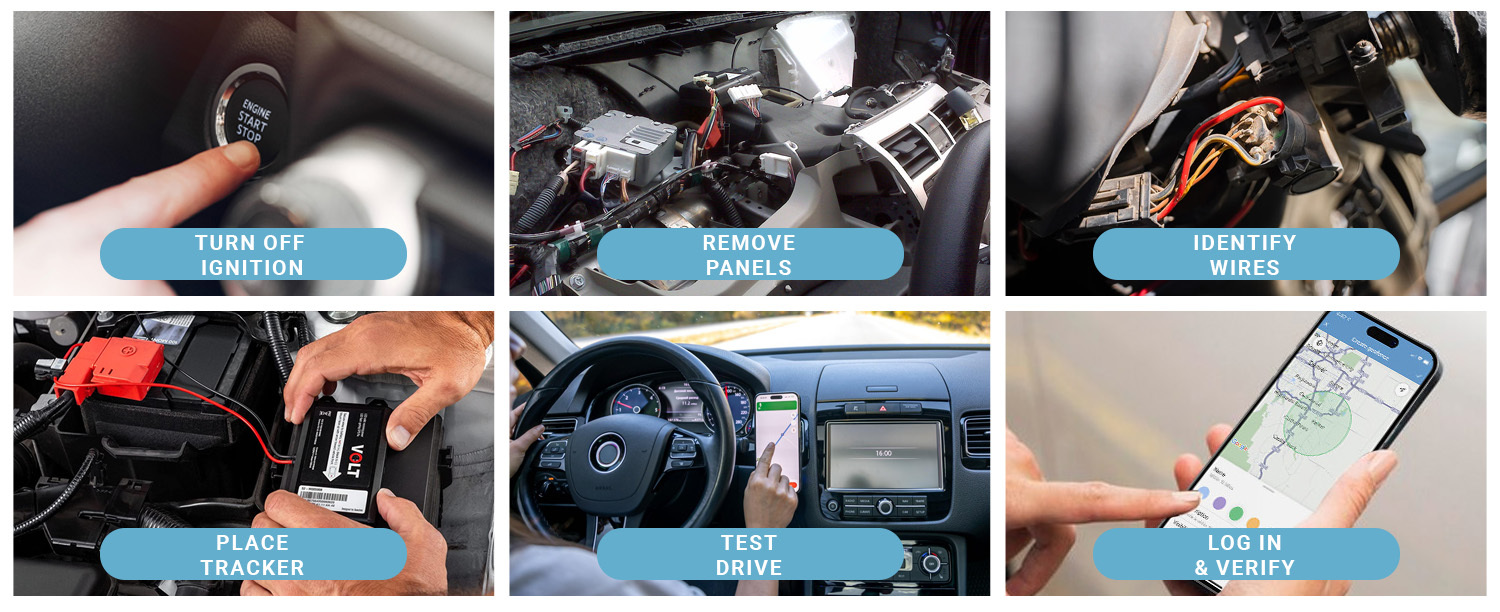
Installing a GPS tracker in your car helps you keep track of its location. The process is simple and does not take much time.
Follow these steps to mount the device, connect it to power, and test the tracker properly.
Mounting The Device
Choose a hidden and secure spot to mount your GPS tracker inside the car. Good places include under the dashboard or behind panels.
Make sure the device does not block airbags or other safety parts. Clean the surface before fixing the tracker to ensure it sticks well.
- Pick a location with good GPS signal
- Hide the device from plain sight
- Clean surface for better adhesion
- Secure with screws or strong tape
Connecting To Power
Most GPS trackers need a constant power supply from the car’s battery. Locate the car’s fuse box or wiring harness to connect the power wires.
Use the red wire for positive and the black wire for negative. Double-check all connections to avoid short circuits or damage.
- Turn off the car before connecting wires
- Connect red wire to positive terminal
- Connect black wire to negative terminal
- Use electrical tape or connectors for safety
Testing The Tracker
After installation, turn on the car and check if the GPS tracker powers up. Use the app or website that comes with the device to see the location.
Drive the car around to confirm the tracker updates the position correctly. Fix any loose wires or poor mounting if the tracker does not work well.
- Power on the car and the GPS tracker
- Open the tracker app or dashboard
- Check the real-time location
- Drive to test tracking accuracy

Credit: spytec.com
Configuring And Using The Tracker
After installing the GPS tracker in your car, you need to set it up correctly. This helps you get accurate tracking data.
Using the tracker well means checking its settings and learning how to monitor your vehicle effectively.
Setting Up The Software
Start by installing the tracking software on your phone or computer. This software connects to your GPS tracker.
Enter your tracker’s ID and follow the on-screen instructions to sync the device with the software.
- Download the official app or software
- Create an account if needed
- Input the tracker’s unique ID number
- Set your preferred language and units
- Choose alert types like speed or location
Tracking And Monitoring Tips
Check the tracker’s location regularly to keep your car safe. Use the app to view live or past routes.
Set alerts for unusual activity, such as speeding or leaving a specific area, to stay informed.
- Review location updates often
- Set geofence zones for alerts
- Monitor speed limits to avoid tickets
- Save trip history for later use
- Keep your software updated for best results
Troubleshooting Common Issues
If the tracker stops sending data, check the power connection and battery level first.
Make sure your software is up to date and your internet connection is working well.
- Verify the tracker is properly connected to power
- Restart the device if it freezes
- Update the tracking software regularly
- Check your phone or computer internet connection
- Contact support if problems continue
Credit: www.brickhousesecurity.com
Frequently Asked Questions
What Tools Do I Need To Install A Gps Tracker In My Car?
You need a GPS tracker, basic hand tools, wire strippers, electrical tape, and a smartphone or computer.
Where Should I Place The Gps Tracker In My Car?
Place the tracker under the dashboard, inside the glove box, or beneath the seats for best signal.
How Do I Connect The Gps Tracker To My Car’s Power?
Connect the tracker’s red wire to the car battery’s positive terminal and the black wire to ground.
Can I Install A Gps Tracker Without Professional Help?
Yes, many trackers come with simple instructions for easy DIY installation by beginners.
How Do I Test If My Gps Tracker Is Working Properly?
Turn on the tracker, check the signal on the app, and verify the location updates correctly.
Conclusion
Installing a GPS tracker in your car is simple and useful. It helps keep your vehicle safe and easy to find. Follow the steps carefully for the best results. Make sure the tracker is placed where it won’t get damaged.
Test the device after installation to confirm it works well. Regular checks keep the tracker running smoothly. This small effort brings peace of mind every day. Stay secure and enjoy the benefits of GPS tracking.