

Last Updated on June 28, 2026 by Eric B. Steele
Is your KitchenAid refrigerator’s water not tasting as fresh as it used to? Changing the water filter is the simple fix you need to enjoy clean, crisp water again.
But if you’ve never done it before, the process might seem tricky or confusing. Don’t worry—this guide will walk you through each step clearly and quickly. By the end, you’ll know exactly how to change your water filter, keeping your fridge running smoothly and your water pure.
Keep reading—you’ll be surprised how easy it is!
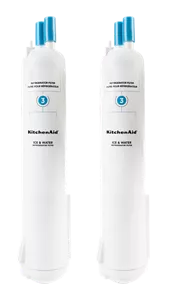
Credit: www.kitchenaid.com
Locate The Water Filter
Changing the water filter in your KitchenAid refrigerator keeps your water clean and fresh. First, you need to find where the water filter is located.
Knowing the filter location helps you change it quickly and easily. This guide explains how to locate the filter.
Check The Manual
The best way to find the water filter is to check your refrigerator’s manual. It shows the exact spot of the filter for your model.
If you lost the paper manual, you can often find a digital copy online. Search using your refrigerator’s model number.
Common Filter Locations
KitchenAid refrigerators usually have water filters in common spots. Knowing these spots helps you find the filter fast.
- Inside the fresh food compartment, near the top right corner
- Behind the grille at the base of the refrigerator
- In the upper right interior wall of the fridge
- Near the water dispenser area

Credit: www.youtube.com
Remove The Old Filter
Changing the water filter in your Kitchenaid refrigerator is important for clean water. Follow these steps to remove the old filter easily.
Make sure you have the right tools and prepare your area before starting. This will make the process smooth and quick.
Prepare The Area
Before you start, clear the space around your refrigerator. This helps you work without any obstacles.
- Move items away from the front of the fridge.
- Keep a towel handy to catch any water spills.
- Ensure you have the new filter ready.
Twist Or Push To Release
Different models have different ways to remove the filter. Check your model for specific instructions.
For twist models, turn the filter counterclockwise. For push models, press the button to release.
| Model Type | Action |
| Twist | Turn counterclockwise |
| Push | Press button |
Install The New Filter
Replacing the water filter in your KitchenAid refrigerator is simple. Installing the new filter correctly ensures clean and fresh water.
Follow these steps carefully to align and secure the filter for the best results.
Align And Insert
First, check the new filter for the arrow mark. This mark shows the correct direction to insert the filter.
- Hold the filter with the arrow facing the filter slot.
- Line up the filter so it fits into the slot smoothly.
- Push the filter gently but firmly into place until it stops.
Secure The Filter
After inserting the filter, you need to lock it to prevent leaks and ensure proper flow.
| Action | Description |
|---|---|
| Turn clockwise | Rotate the filter to the right about a quarter turn. |
| Feel the click | The filter locks in place with a soft click sound. |
| Check stability | Try to move the filter gently. It should not wobble. |
Reset The Filter Indicator
After changing the water filter in your KitchenAid refrigerator, you need to reset the filter indicator. This keeps track of when the filter was last replaced.
Resetting the indicator helps you know when to change the filter again for clean and fresh water.
Use The Control Panel
Find the control panel on your refrigerator door. It shows the filter status and other settings.
- Press and hold the “Reset Filter” button.
- Keep holding for 3 seconds or until the indicator light blinks.
- Release the button once the light turns off or resets.
- The filter indicator will now show a full life cycle.
Confirm Reset
After resetting, check the control panel to confirm the indicator is off. This means the reset was successful.
| Indicator Light | Meaning |
|---|---|
| Off | Filter reset and working well |
| On | Filter needs replacement soon |
| Blinking | Filter reset in progress |
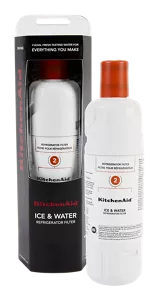
Credit: www.kitchenaid.com
Frequently Asked Questions
How Often Should I Change My Kitchenaid Refrigerator Water Filter?
Change the water filter every 6 months or after filtering about 200 gallons of water.
What Tools Do I Need To Replace The Kitchenaid Water Filter?
No tools are needed; just twist and pull the filter by hand to remove it.
How Do I Locate The Water Filter In A Kitchenaid Fridge?
The filter is usually inside the fridge, top right or bottom grille area.
Can I Use Any Water Filter In My Kitchenaid Refrigerator?
Use only filters designed for KitchenAid models to ensure proper fit and water quality.
How Do I Reset The Water Filter Indicator Light?
Press and hold the reset button for 3 seconds after replacing the filter to reset the light.
Conclusion
Changing the water filter in your KitchenAid refrigerator keeps water clean and fresh. The process is simple and quick to follow. Regular filter changes help avoid bad taste and odors. Clean filters also protect your fridge’s water system. Remember to check the filter type before buying a replacement.
Doing this task yourself saves time and money. Keep your water healthy with easy filter swaps. Simple steps make a big difference in water quality. Stay on schedule to enjoy fresh water every day.